
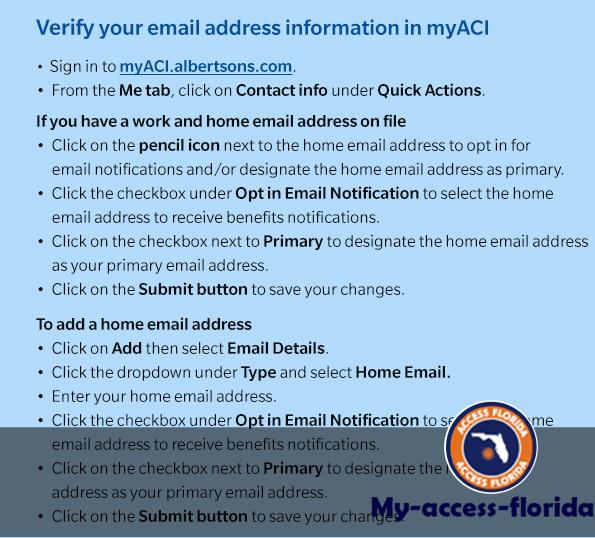
Setting up email alerts for your Florida Benefits account can help you stay informed and up-to-date on important information regarding your benefits. By receiving timely notifications directly to your email, you can ensure you never miss important updates, deadlines, or changes to your account. This guide will walk you through the process of setting up email alerts step-by-step, making it easy for you to stay connected and informed about your Florida Benefits account.
Introduction
Setting up email alerts for your Florida Benefits Account can help you stay informed about important updates, deadlines, and changes to your benefits. By receiving notifications directly to your email, you can ensure you never miss critical information that could impact your benefits. This guide will walk you through the process of setting up email alerts step by step, making it easier for you to manage your benefits efficiently.
1. Importance of Email Alerts
One of the main advantages of setting up email alerts is that you can receive real-time updates about your benefits without having to constantly check your account manually. This proactive approach ensures that you are always aware of any changes or actions required on your part, helping you stay organized and on top of your benefits.
2. Customization Options
When setting up email alerts, you can often customize the type of notifications you receive, allowing you to tailor the information based on your preferences. Whether you want to be notified about payment deposits, application status updates, or upcoming deadlines, you can choose the alerts that are most relevant to you.
Benefits of Setting Up Email Alerts
Email alerts offer a convenient way to stay informed about your Florida benefits account without having to constantly check for updates manually. By setting up email alerts, you can receive notifications about important account activities, such as when a new document is available, when a payment has been processed, or when there is a change in your account status. This can help you stay organized and up-to-date on any changes that may affect your benefits.
Increased Awareness of Account Activity
One of the key benefits of setting up email alerts is the increased awareness of your account activity. By receiving real-time notifications, you can promptly address any issues that may arise, such as missing payments or discrepancies in your account information. This proactive approach can help prevent potential problems and ensure that you are always informed about what is happening with your Florida benefits account.
Step-by-Step Guide to Setting Up Email Alerts
1. Accessing Your Account Settings
To begin setting up email alerts for your Florida benefits account, log in to your account using your username and password. Once logged in, navigate to the settings section of your account dashboard.
2. Enabling Email Notifications
Within the settings menu, look for the notifications or alerts tab. Here, you will find the option to enable email alerts for various activities such as account updates, payment notifications, and important deadlines. Toggle the switch to enable email notifications for the desired events.
3. Setting Preferences and Frequency
After enabling email notifications, you can further customize your preferences. Choose the type of notifications you wish to receive via email and set the frequency of these alerts. Remember to save your changes before exiting the settings menu to ensure your preferences are updated.
Troubleshooting Common Issues
Overview
When setting up email alerts for your Florida benefits account, you may encounter common issues that can prevent the alerts from working properly. Understanding these issues and how to troubleshoot them can help ensure you receive important notifications about your benefits in a timely manner.
Email Not Received
If you have set up email alerts but are not receiving any notifications, there could be several reasons for this issue. First, check your spam or junk folder to see if the emails are being filtered there. Additionally, ensure that the email address you provided is correct and up to date in your account settings. If the problem persists, contact the customer support team for further assistance.

Frequently Asked Questions
Overview
Section 5 provides answers to the most common questions regarding setting up and managing email alerts for your Florida Benefits Account. These questions cover various aspects of the process to ensure users have a smooth experience.
How do I activate email alerts?
To activate email alerts, log in to your Florida Benefits Account, navigate to the settings section, and select the option to enable email notifications. You can then customize the types of alerts you wish to receive based on your preferences.
What types of alerts can I receive?
Users can receive alerts for various activities such as account logins, benefit updates, document uploads, and more. It is recommended to select alerts that are relevant to your needs to stay informed about important account activities.
Tips for Managing Your Florida Benefits Account
Overview
Managing your Florida benefits account efficiently is essential to ensuring you receive timely updates and access to the support you need. This section provides valuable tips and strategies to help you navigate your account effectively and make the most out of the available resources.
Setting Up Account Notifications
One key tip for managing your Florida benefits account is to enable account notifications. By setting up email alerts for important updates, such as benefit changes or application status updates, you can stay informed and take action promptly. Be sure to customize your notification settings to receive alerts for specific events that are relevant to you.
Regularly Reviewing Your Account
Another important tip is to regularly review your account information to ensure accuracy and completeness. Verify your personal details, income information, and benefit eligibility criteria to avoid any potential issues or delays in receiving benefits. By staying proactive and keeping your account up to date, you can streamline the process and access your benefits smoothly.
Conclusion
Conclusion: In conclusion, setting up email alerts for your Florida benefits account is a convenient way to stay informed about important updates, notifications, and account activities. By receiving email notifications, you can stay on top of any changes to your benefits, upcoming deadlines, or any suspicious account activities. Overall, email alerts help you manage your benefits account more efficiently and effectively.
Next Steps
Next Steps: After setting up email alerts, make sure to regularly check your email for notifications from your Florida benefits account. If you encounter any issues or have any questions about the alerts you receive, refer to the troubleshooting section of this guide for solutions. Additionally, consider exploring other features of your benefits account to further optimize your user experience.